반응형

👋 들어가기 전
이번 포스팅은 다소 낯선 개념이다.
바로 textfielStyle이다.
Style Suffix가 붙은 애들은 앞에 View들의 스타일을 쉽게 변경할 수 있도록
도와주는 프로토콜이다.
즉, 우리의 첫번째 Style은 TextField다.
✊기본 TextFieldStyle
먼저 기본적으로 제공해주는 요소를 보자.
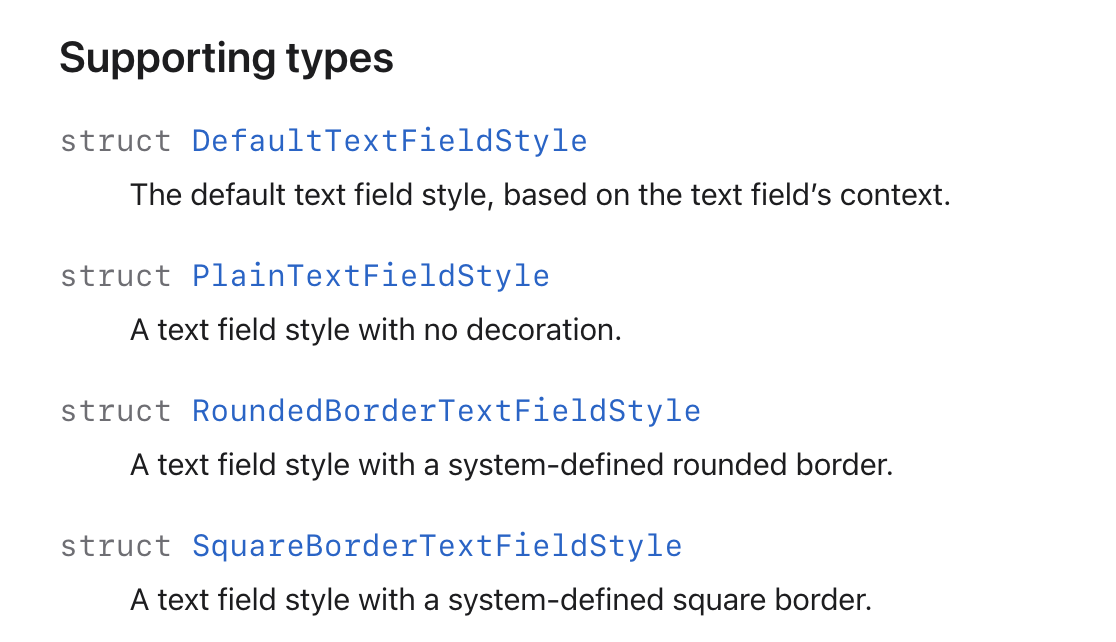

| static var | supporting types | 설명 |
| .automatic | DefaultTextFieldStyle | 플랫폼에 따른 기본 스타일 |
| .plane | PlanTextFiledStyle | 스타일이 없는 형태 |
| .roundBorder | RoundedBorderTextFieldStyle | 둥근 테두리 |
| .squareBorder | SquareBorderTextFieldStyle | 사각형 테두리 (iOS 16+) |
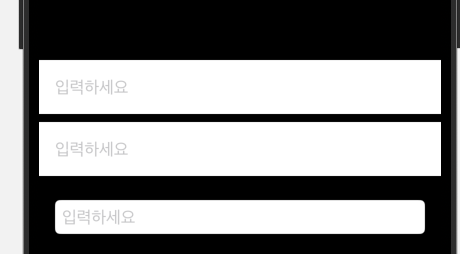
    VStack {
      TextField("입력하세요", text: $text)
        .textFieldStyle(.automatic)
        .padding()
        .background(.white)

      TextField("입력하세요", text: $text)
        .textFieldStyle(.plain)
        .padding()
        .background(.white)

      TextField("입력하세요", text: $text)
        .textFieldStyle(.roundedBorder)
        .padding()
    }
☝️커스텀 Style 만들기
여기서 핵심은 _body(configuration:) 함수를 구현해야한다.
func _body(configuration: TextField<Self._Label>) -> some View {
	//
}
여가서 configuration 타입을 살펴보면 제네릭에 신기한 형태가 있다 Label이 들어가 있네 ??

TextField를 잠깐 살펴보자.
텍스트를 입력하고 멈춰보니 정적인 Label 형태 같이보인다.
그렇다 <Self.Label>은 TextField안에 존재하는 Label을 가르킨다.
우리는 configuration이라는 파라미터를 통해 안에 있는 Label을 꾸미는 것이다.
다음과 같이 작성 후
struct CustomTextFieldStyle: TextFieldStyle {
  func _body(configuration: TextField<Self._Label>) -> some View {
    configuration
      .padding(10)
      .background(RoundedRectangle(cornerRadius: 8).stroke(Color.blue, lineWidth: 2))
      .shadow(radius: 2)
  }
}

VStack {
  TextField("입력하세요", text: $text)
    .textFieldStyle(CustomTextFieldStyle())
    .padding()
}
짜잔 굉장히 쉽게 적용된다.

😀 소감 및 마무리
별도의 뷰를 상황마다 만드는 것보다 이렇게 style 기능을 확장해서
style 메서드를 통해 갱신하는게 훨씬 편한 것 같다.
출처
TextFieldStyle | Apple Developer Documentation
A specification for the appearance and interaction of a text field.
developer.apple.com
반응형
'iOS > SwiftUI' 카테고리의 다른 글
| @Observable 매크로 (0) | 2025.07.03 |
|---|---|
| Custom Carousel 만들기 (0) | 2025.03.16 |
| .scrollTargetLayout (0) | 2025.03.15 |
| TabView (0) | 2025.03.05 |
| UIViewRepresentable (0) | 2024.10.12 |