👋 들어가기 전
종종, 실제 앱에서 구현력을 요구하는 UI를 혼자서 조금씩 연습해보려고한다.
대망의 첫번 째 시리즈는 인피니티 포커싱 캐러셀이다.
내가 이름을 붙힌거긴하지만, 어떤 구성요소인지는 아래에서 설명하겠다.
🏁 학습할 내용
- 레퍼런스
- 요구사항
- 포커싱
- 인피니티
- 구현
- 전체 코드
- 컴포지셔널을 이용한 인피니티 스크롤 구현
🤩 레퍼런스
참고 레퍼런스 바로, 현대 백화점 앱이다.
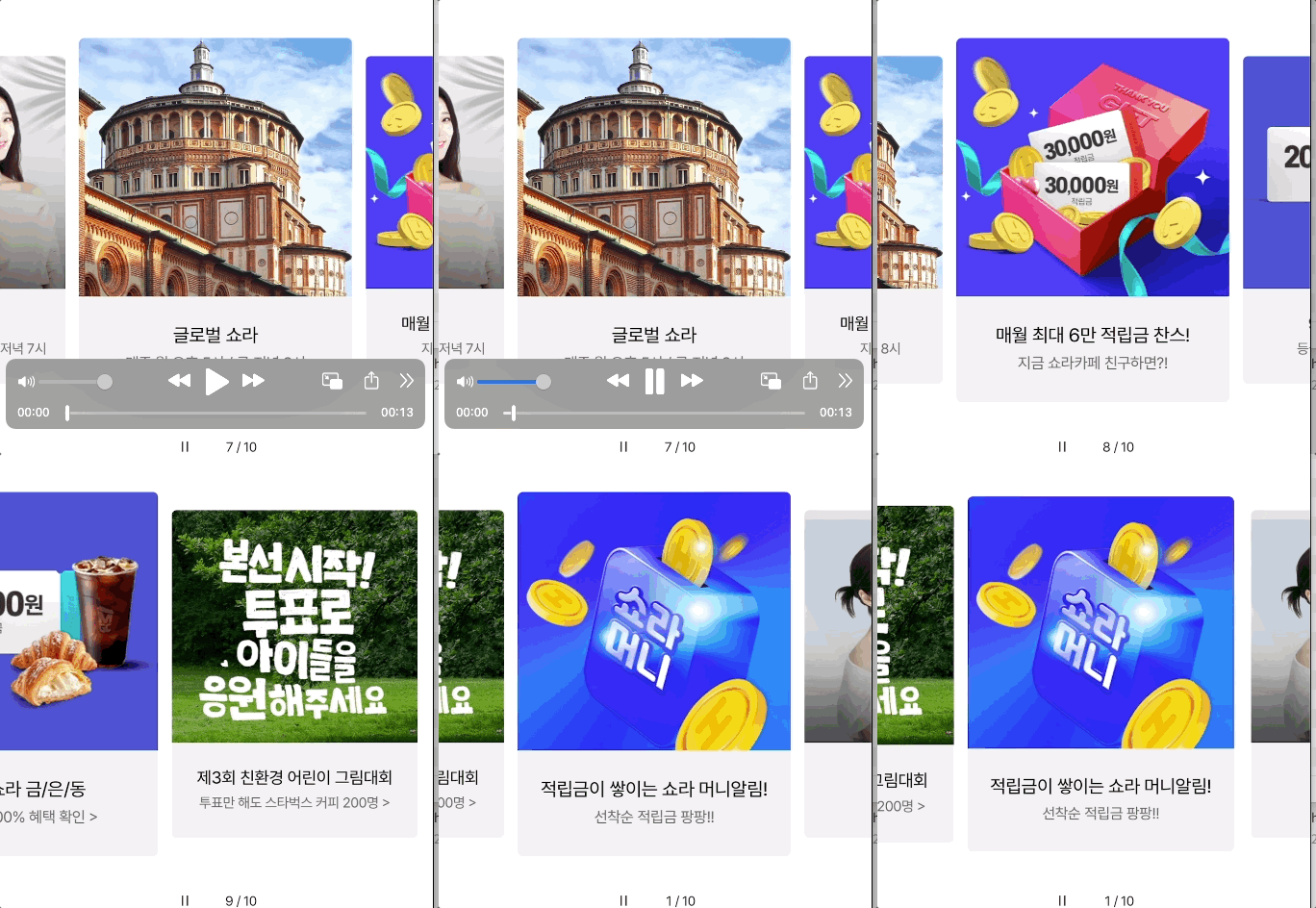
특징을 보면 다음과 같다.
- 항상 중앙에 컨텐츠가 정렬되며, 중앙에 가까워질 록 크기가 커지고, 나머지는 일정 비율만큼 축소되어있다.
- 현재 10개의 아이템이 보이는데, 9번째를 넘어가면 0번째가 자연스럽게나오고, 0번째에서 9번째로 넘어갈 수 있다.
🎯 요구 사항
🧘 포커싱
포커싱은 2개의 동작을 뜻한다.
- 가운데 정렬
- 가운데 아이템을 제외한, 아이템은 축소 Scale
🔄 인피니티
눈치 챘겠지만, 인피니티는 순환되는 느낌이다.
- 왼쪽 끝(0번 째) 아이템에서 왼쪽 스크롤 시, 오른쪽 끝(마지막) 아이템이 나온다.
- 오른쪽 끝(마지막 아이템)에서 오른쪽 스크롤 시, 왼족 끝(0번 째) 아이템이 나온다.
1️⃣ 포커싱
포커싱은 중앙정렬 + Scale 차별화인데, 먼저 중앙정렬부터 알아보자.
🅰️ 중앙정렬
FlowLayout에서 중앙정렬의 핵심 targetContentOffset이다.
override func targetContentOffset(forProposedContentOffset proposedContentOffset: CGPoint, withScrollingVelocity velocity: CGPoint) -> CGPoint
역할과 파라미터를 알아보자.
- 역할
- 스크롤이 끝나서 정지할 최종 위치를 결정
- 파라미터
- proposedContentOffset: 시스템이 계산한 최종 정지 예상 위치
- velocity: 스크롤 속도
- 호출시기
- 스크롤 시
- 리턴
- 정지할 위치
  override func targetContentOffset(
    forProposedContentOffset proposedContentOffset: CGPoint,
    withScrollingVelocity velocity: CGPoint
  ) -> CGPoint {
    guard let collectionView = collectionView
    else {
      return super.targetContentOffset(forProposedContentOffset: proposedContentOffset, withScrollingVelocity: velocity)
    }

    // 왼쪽으로 스크롤 중이면,  왼쪽꺼를, 오른쪽으로 스크롤 중이면, 오른쪽꺼를 우선 중앙에 배치
    let attribute = visibleLayoutAttributesInOffset(at: collectionView.contentOffset).first {
      guard let offset = centeredContentOffset(forRect: $0.frame) else {
        return false
      }
      // velocity.x.sign
      // .plus(오른쪽으로 스크롤)
      // .minus(왼쪽으로 스크롤)
      return (offset.x - collectionView.contentOffset.x).sign == velocity.x.sign
    }

    if let attribute = attribute,
       let offset = centeredContentOffset(forRect: attribute.frame) {
      return offset // 계산된 위치리턴
    } else {
      return super.targetContentOffset(forProposedContentOffset: proposedContentOffset, withScrollingVelocity: velocity)
    }
  }

  /// 현재보이는 Attributes를 contentOfssetX 기준으로 가까운 순으로 정렬
  private func visibleLayoutAttributesInOffset(at offset: CGPoint) -> [UICollectionViewLayoutAttributes] {
    guard let collectionView = collectionView else {
      return []
    }

    return super.layoutAttributesForElements(in: .init(origin: offset, size: collectionView.frame.size))?
      .sorted(by: { lhs, rhs in
        return  lhs.frame.midX - collectionView.contentOffset.x < rhs.frame.midX - collectionView.contentOffset.x
      }) ?? []
  }

  // attribute의 center에 해당하는
  private func centeredContentOffset(forRect rect: CGRect) -> CGPoint? {
    guard let collectionView = collectionView else {
      return nil
    }

    // 왼쪽으로 밀어야, 중앙에 위치하므로 collectionView의 절반 너비 만큼 빼야함
    return .init(x: abs(rect.midX - collectionView.frame.width / 2), y: collectionView.contentOffset.y)
  }

🅱️ 스케일
핵심 메서드는 layoutAttributesForElements이다.
override func layoutAttributesForElements(in rect: CGRect) -> [UICollectionViewLayoutAttributes]?
역할과 파라미터를 알아보자.
- 역할
- 특정 영역(rect)에 표시될 아이템들의 레이아웃 속성을 반환하는 메서드
- 파라미터
- rect: 컬렉션 뷰가 현재 화면에 보여주려는 영역
- 호출시기
- 스크롤 시
- 리턴
- 각 셀/뷰의 레이아웃 속성 객체
여기서 핵심은 스케일 비율을 계산할 때, 실제 CollectionView의 center로부터 얼마나 머냐를
잘 계산해야한다.
 override func layoutAttributesForElements(in rect: CGRect) -> [UICollectionViewLayoutAttributes]? {
    guard let attributes = super.layoutAttributesForElements(in: rect)
    else { return nil }

    return attributes.compactMap { transform(attributes: $0) }
  }

  private func transform(attributes: UICollectionViewLayoutAttributes) -> UICollectionViewLayoutAttributes {
    guard let collectionView = collectionView
    else { return attributes }

    let collectionViewCenter = collectionView.frame.size.width / 2
    let contentOffsetX = collectionView.contentOffset.x
    let center = attributes.center.x - contentOffsetX

    let maxDistance = self.itemSize.width + self.minimumLineSpacing // 중앙으로부터, maxDistance 넘어가면, 모두 minimumItemScale
    let distance = min(abs(collectionViewCenter - center), maxDistance)

    let ratio = (maxDistance - distance) / maxDistance
    let scale = ratio * (1 - UI.minimumItemScale) + UI.minimumItemScale // 최종 sacle
    let baseAlphaRatio = 0.5

    let transform = CATransform3DScale(CATransform3DIdentity, scale, scale, 1)

    attributes.transform3D = transform
    attributes.alpha = max(ratio, baseAlphaRatio)

    return attributes
  }
여기서 하나 더, 사이 간격을 한번 주목해보자.
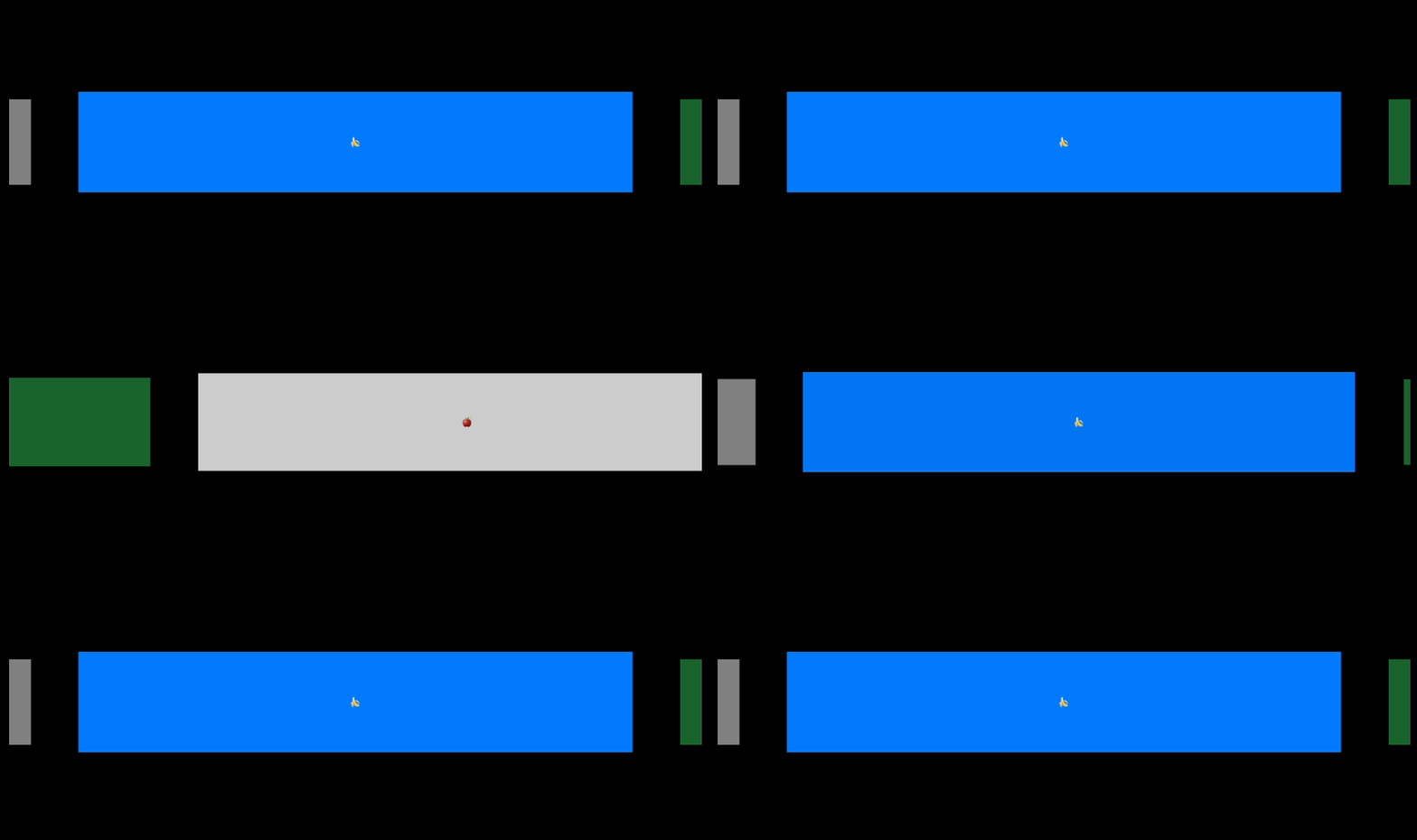
나는 분명 12로 짧게 줬는데, 엄청 벌어져있다.
이유가 뭘까??
정답은 scale하면 그 만큼 작아지니깐, 12 + 스케일로 작아진 너비 만큼 간격이 더 벌어져있다.
그러므로 우리는 12에서 스케일로 줄어드는 간격을 뺴줘야한다.
    let itemWidth = self.itemSize.width

    let scaledItemOffset: CGFloat = (itemWidth - UI.minimumItemScale * itemWidth) / 2 // 축소 시, 차감된 간격 = 2A , 2A/2 = A(열간격에서 차감해야될 )

    self.scrollDirection = .horizontal

    // 스케일로 줄어드는 만큼, spacing을 축소
    self.minimumLineSpacing = UI.itemSpacing - scaledItemOffset

♻️ 무한스크롤
무한 스크롤의 핵심 로직은 2가지다.
첫번 째는, 원래 아이템보다 3배수로 만들기, 아이템이 3개만, cell이 9개 필요 (따로 코드 설명 X)
두번 째는, 끝 지점이 보일라고 할 때, 다시 중앙 근처로 위치시키는 것
세번 쨰는, 처음 뷰가 보일 때 조차, 중앙으로 보여주기
🅰️ 중앙 근처로 이동 시키기
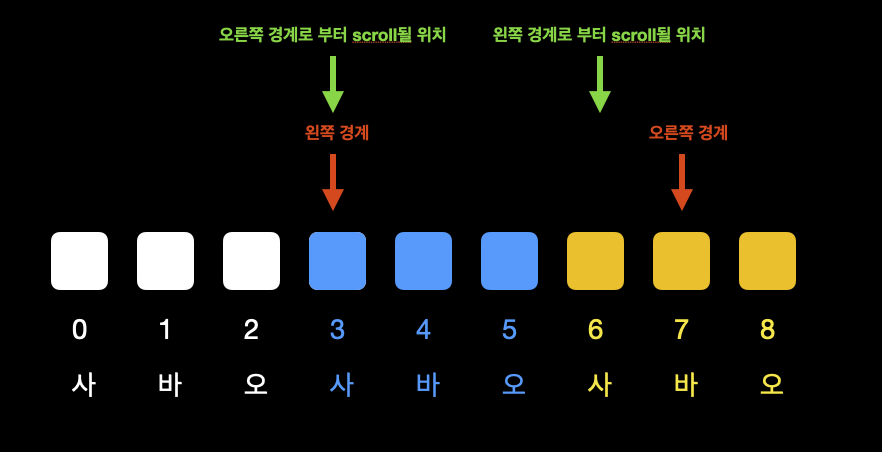
 func scrollTo(page: Int) {
    // scrollViewDidScroll 호출되지 않음
    guard let layout = collectionViewLayout as? UICollectionViewFlowLayout
    else { return }

    let pagingSize = layout.itemSize.width + layout.minimumLineSpacing
    let offset = CGPoint(
      x: contentOffset.x.truncatingRemainder(dividingBy: pagingSize) + CGFloat(page) * pagingSize,
      y: 0
    )

    self.contentOffset = offset
  }

 func scrollViewDidScroll(_ scrollView: UIScrollView) {
    forceScrollToTargetPage(scrollView: scrollView)
 }

 private func forceScrollToTargetPage(scrollView: UIScrollView) {
    guard let layout = collectionViewLayout as? UICollectionViewFlowLayout,
          let originalItemCount = self.originalItemCount,
          originalItemCount != 0
    else { return }

    let pageWidth = layout.itemSize.width + layout.minimumLineSpacing
    let page = Int(round(scrollView.contentOffset.x / pageWidth))
    /// 여기서 scrollTo에 전달될 page는 왼쪽에 위치될 page다.
    /// 예를들어 중앙에 4page가 와야하면, 스크롤을 3page까지 해주면, CenterScaleSnapFlowLayout 내부에서 중앙을 잡읍
    if page == originalItemCount * 2 + 1 {
      scrollTo(page: originalItemCount)

    } else if page == originalItemCount {
      scrollTo(page: originalItemCount * 2)
    }
 }
🅱️ 처음 스크롤 위치 중앙으로 위치
최초 뷰가 보일 떄만, 중앙으로 가야하므로 플래그 변수와 함께, viewDidLayoutSubviews 시점에 호출한다.
override func viewDidLayoutSubviews() {
    super.viewDidLayoutSubviews()
    collectionView.scrollToCenter()
}

func scrollToCenter() {
    guard let originalItemCount = self.originalItemCount,
          isInitalizedScrolled == false
    else { return }

    //scrollToItem으로 하는 이유는 UICollectionViewDelegate의 scrollViewDidScroll를 호출하기위해
    scrollToItem(at: [0, originalItemCount * 2], at: .centeredHorizontally, animated: false)
    isInitalizedScrolled = true
}
😂 전체코드
CenterFocusedCarouselLayout.swift
protocol CenterFocusedCarouselLayoutDelegate: AnyObject {
    func didUpdateCenterIndexPath(_ indexPath: IndexPath?)
}

final class CenterFocusedCarouselLayout: UICollectionViewFlowLayout {
    enum ItemSizeStrategy {
        /// 절대 고정 크기
        case fixed(CGSize)
        /// 너비 비율(portrait, landscape)
        case widthFraction(CGFloat, CGFloat)
    }

    var spacing: CGFloat = 10
    var sideItemScale: CGFloat = 1.0
    var heightRatio: CGFloat = 0.75
    var isRotating = false
    var threshold: CGFloat = 0.5
    /// 중앙인덱스가 바뀔 때만 호출
    var shouldNotifyOnlyWhenCenterIndexPathChanges = true

    weak var delegate: CenterFocusedCarouselLayoutDelegate?

    private var currentWidth: CGFloat?
    private var currentCenteredIndexPath: IndexPath?
    private var isInitialLayout: Bool = true
    private let itemSizeStrategy: ItemSizeStrategy

    init(itemSizeStrategy: ItemSizeStrategy) {
        self.itemSizeStrategy = itemSizeStrategy
        super.init()
        scrollDirection = .horizontal
    }

    required init?(coder: NSCoder) {
        fatalError("init(coder:) has not been implemented")
    }

    override func prepare() {
        super.prepare()
        guard let collectionView = collectionView else { return }

        // 첫 prepare 또는 회전 시 configure
        if isInitialLayout || isRotating {
            configure(bounds: collectionView.bounds)
            isInitialLayout = false

            if isRotating {
                restoreCenter()
            }
        }

        isRotating = false
    }

    override func shouldInvalidateLayout(forBoundsChange newBounds: CGRect) -> Bool {
        // 이전 너비와 새로운 너비가 다를 경우에만 isRotating을 true로 설정
        if let currentWidth = self.currentWidth, currentWidth != newBounds.width {
            isRotating = true
        }

        self.currentWidth = newBounds.width
        return true
    }

    override func layoutAttributesForElements(in rect: CGRect) -> [UICollectionViewLayoutAttributes]? {
        guard let attrs = super.layoutAttributesForElements(in: rect),
              let collectionView = collectionView else { return nil }

        let centerX = collectionView.contentOffset.x + collectionView.bounds.width / 2

        for attr in attrs {
            let distance = abs(attr.center.x - centerX)
            let maxDistance = itemSize.width + minimumLineSpacing
            let ratio = min(distance / maxDistance, 1)

            let scale = sideItemScale + (1 - sideItemScale) * (1 - ratio)
            attr.transform = CGAffineTransform(scaleX: scale, y: scale)
        }

        return attrs
    }

    override func targetContentOffset(forProposedContentOffset proposedContentOffset: CGPoint,
                                      withScrollingVelocity velocity: CGPoint) -> CGPoint {
        guard let collectionView else { return proposedContentOffset }

        // 1. 페이지 단위 폭 (셀 너비 + 최소 간격)
        let pageWidth = itemSize.width + minimumLineSpacing

        // 2. 현재 스크롤 위치 기반의 대략적인 인덱스 계산
        let approximateScrollingIndex = collectionView.contentOffset.x / pageWidth

        // 3. 속도(velocity)와 이동 거리(delta)를 기반으로 타겟 인덱스 결정
        var targetIndex: CGFloat

        if velocity.x > threshold {
            // 빠르게 오른쪽으로 스와이프 -> 다음 페이지
            targetIndex = ceil(approximateScrollingIndex)
        } else if velocity.x < -threshold {
            // 빠르게 왼쪽으로 스와이프 -> 이전 페이지
            targetIndex = floor(approximateScrollingIndex)
        } else {
            // 속도가 느릴 때는 가장 가까운 페이지로 반올림
            targetIndex = round(proposedContentOffset.x / pageWidth)
        }

        // 4. 최소/최대 인덱스 제한
        let maxIndex = CGFloat(collectionView.numberOfItems(inSection: 0) - 1)
        targetIndex = max(0, min(targetIndex, maxIndex))

        // 5. 최종 X 좌표 계산
        // (인덱스 * 너비)를 하면 정확히 중앙에 스냅됩니다. (sectionInset이 양 옆 동일할 때)
        let targetX = targetIndex * pageWidth

        // 인덱스 업데이트 알림
        let newIndexPath = IndexPath(item: Int(targetIndex), section: 0)

        let isChanged = (currentCenteredIndexPath != newIndexPath)

        // 인덱스가 바뀌었거나, 바뀌지 않았어도 '매번 알림' 모드일 때 호출
        if isChanged || !shouldNotifyOnlyWhenCenterIndexPathChanges {
            delegate?.didUpdateCenterIndexPath(newIndexPath)
        }

        currentCenteredIndexPath = newIndexPath

        return CGPoint(x: targetX, y: proposedContentOffset.y)
    }

    func initCenterIndexPath(indexPath: IndexPath) {
        self.currentCenteredIndexPath = indexPath
    }

    func restoreCenter() {
        guard let targetPoint = centerPoint(),
              let collectionView = collectionView
        else { return }
        collectionView.contentOffset = targetPoint
    }

    private func centerPoint() -> CGPoint? {
        guard let indexPath = currentCenteredIndexPath,
              let collectionView = collectionView
        else { return nil }

        // 1. 현재 인덱스의 X 좌표 계산
        // (인덱스 * 전체 한 페이지 너비) + 좌측 인셋
        let pageWidth = itemSize.width + minimumLineSpacing
        let xPosition = CGFloat(indexPath.item) * pageWidth + sectionInset.left

        // 2. 셀의 중앙값
        let cellCenterX = xPosition + (itemSize.width / 2)

        // 3. 컬렉션뷰 중앙에 맞추기 위한 오프셋
        let targetX = cellCenterX - (collectionView.bounds.width / 2)

        return CGPoint(x: targetX, y: 0)
    }

    private func configure(bounds: CGRect) {
        itemSize = calcItemSize(bounds: bounds)

        let horizontalInset = (bounds.width - itemSize.width) / 2

        self.sectionInset = UIEdgeInsets(top: 0, left: horizontalInset, bottom: 0, right: horizontalInset)

        let ItemWidth = itemSize.width

        let scaledItemOffset = (ItemWidth - ItemWidth * sideItemScale) / 2
        self.minimumLineSpacing = spacing - scaledItemOffset
    }

    private func calcItemSize(bounds: CGRect) -> CGSize {
        switch itemSizeStrategy {
        case let .fixed(fixiedSize):
            return fixiedSize
        case let .widthFraction(portraitRatio, landSacpeRatio):
            let width = bounds.width * (UIDevice.current.orientation == .portrait ? portraitRatio : landSacpeRatio)
            let height = width * heightRatio
            return CGSize(width: width, height: height)
        }
    }
}
CenterScaleSnapCollectionView.swift
final class CenterScaleSnapCollectionView: UICollectionView {
  private lazy var diffableDataSource: DataSource = makeDataSource()
  private var originalItemCount: Int?
  private var isInitalizedScrolled: Bool = false // 처음에 center 정렬 이후, 막기위해

  override init(frame: CGRect, collectionViewLayout layout: UICollectionViewLayout) {
    super.init(frame: frame, collectionViewLayout: layout)

    self.collectionViewLayout = makeLayout()
    self.delegate = self
    self.isPagingEnabled = false
    self.decelerationRate = .fast
    self.showsHorizontalScrollIndicator = false
    self.contentInsetAdjustmentBehavior = .never
    self.backgroundColor = .clear
  }

  @available(*, unavailable)
  required init?(coder: NSCoder) {
    fatalError("init(coder:) has not been implemented")
  }
}

private extension CenterScaleSnapCollectionView {
  typealias DataSource = UICollectionViewDiffableDataSource<Section, Item>
  typealias CellRegistration = UICollectionView.CellRegistration<UICollectionViewListCell, Item>

  enum Constant {
    static let contentsCount: Int = 3
  }

  func makeCellRegistration() -> CellRegistration {
    return CellRegistration { cell, indexPath, itemIdentifier in
      guard case let .main(model) = itemIdentifier
      else { return }

      cell.indentationLevel = .zero
      cell.backgroundConfiguration = UIBackgroundConfiguration.clear()
      let configuration = ContentConfiguration(modle: model)
      cell.contentConfiguration = configuration
      cell.contentView.frame = cell.bounds
    }
  }

  func makeLayout() -> UICollectionViewFlowLayout {
    let screenWidth = UIScreen.main.bounds.width
    let itemWidth = screenWidth * 0.8
    let itemHeight = 200.0

    let layout = CenterScaleSnapFlowLayout()
    layout.itemSize = CGSize(width: itemWidth, height: itemHeight)
    layout.minimumInteritemSpacing = .zero

    return layout
  }

  func makeDataSource() -> DataSource {
    let cellRegistration = makeCellRegistration()
    return DataSource(collectionView: self) {
      collectionView,
        indexPath,
        itemIdentifier in
      switch itemIdentifier {
      case .main:
        return collectionView.dequeueConfiguredReusableCell(
          using: cellRegistration,
          for: indexPath,
          item: itemIdentifier
        )
      }
    }
  }

  func scrollTo(page: Int) {
    // scrollViewDidScroll 호출되지 않음
    guard let layout = collectionViewLayout as? UICollectionViewFlowLayout
    else { return }

    let pagingSize = layout.itemSize.width + layout.minimumLineSpacing
    let offset = CGPoint(
      x: contentOffset.x.truncatingRemainder(dividingBy: pagingSize) + CGFloat(page) * pagingSize,
      y: 0
    )

    self.contentOffset = offset
  }
}

extension CenterScaleSnapCollectionView {
  typealias Snapshot = NSDiffableDataSourceSnapshot<Section, Item>

  enum Section: Hashable {
    case main
  }

  enum Item: Hashable {
    case main(Model)
  }

  func apply(_ snapShot: Snapshot, originalItemCount: Int) {
    self.originalItemCount = originalItemCount
    diffableDataSource.apply(snapShot, animatingDifferences: false)
  }

  func scrollToCenter() {
    guard let originalItemCount = self.originalItemCount,
          isInitalizedScrolled == false
    else { return }

    //scrollToItem으로 하는 이유는 UICollectionViewDelegate의 scrollViewDidScroll를 호출하기위해
    scrollToItem(at: [0, originalItemCount * 2], at: .centeredHorizontally, animated: false)
    isInitalizedScrolled = true
  }
}

extension CenterScaleSnapCollectionView: UICollectionViewDelegateFlowLayout {
  func scrollViewDidScroll(_ scrollView: UIScrollView) {
    forceScrollToTargetPage(scrollView: scrollView)
  }

  private func forceScrollToTargetPage(scrollView: UIScrollView) {
    guard let layout = collectionViewLayout as? UICollectionViewFlowLayout,
          let originalItemCount = self.originalItemCount,
          originalItemCount != 0
    else { return }

    let pageWidth = layout.itemSize.width + layout.minimumLineSpacing
    let page = Int(round(scrollView.contentOffset.x / pageWidth))
    /// 여기서 scrollTo에 전달될 page는 왼쪽에 위치될 page다.
    /// 예를들어 중앙에 4page가 와야하면, 스크롤을 3page까지 해주면, CenterScaleSnapFlowLayout 내부에서 중앙을 잡읍
    if page == originalItemCount * 2 + 1 {
      scrollTo(page: originalItemCount)

    } else if page == originalItemCount {
      scrollTo(page: originalItemCount * 2)
    }
  }
}
ViewController.swift
class ViewController: UIViewController {
  private var expandedItems: [Model] = [
    .init(text: "🍎", color: .white),
    .init(text: "🍌", color: .systemBlue),
    .init(text: "🍊", color: .systemGreen),
    .init(text: "🍎", color: .white),
    .init(text: "🍌", color: .systemBlue),
    .init(text: "🍊", color: .systemGreen),
    .init(text: "🍎", color: .white),
    .init(text: "🍌", color: .systemBlue),
    .init(text: "🍊", color: .systemGreen),
  ]

  private let collectionView = CenterScaleSnapCollectionView(frame: .zero, collectionViewLayout: .init())

  override func viewDidLoad() {
    super.viewDidLoad()

    view.addSubview(collectionView)
    collectionView.snp.makeConstraints {
      $0.horizontalEdges.equalToSuperview()
      $0.height.equalTo(300)
      $0.centerY.equalToSuperview()
    }

    apply()
  }

  override func viewDidLayoutSubviews() {
    super.viewDidLayoutSubviews()
    collectionView.scrollToCenter()
  }

  func apply() {
    var snapShot = CenterScaleSnapCollectionView.Snapshot()
    snapShot.appendSections([.main])
    snapShot.appendItems(expandedItems.map{.main($0)}, toSection: .main)
    collectionView.apply(snapShot, originalItemCount: 3)
  }
}
ContentView.swift
struct ContentConfiguration: UIContentConfiguration {
  let modle: Model

  init(modle: Model) {
    self.modle = modle
  }

  func makeContentView() -> any UIView & UIContentView {
    ContentView(configuration: self)
  }

  func updated(for state: any UIConfigurationState) -> ContentConfiguration {
    self
  }
}

final class ContentView: UIView, UIContentView {
  var configuration: any UIContentConfiguration {
    didSet {
      update()
    }
  }

  let title = UILabel()

  init(configuration: any UIContentConfiguration) {
    self.configuration = configuration
    super.init(frame: .zero)

    setupUI()
  }

  @available(*, unavailable)
  required init?(coder: NSCoder) {
    fatalError("init(coder:) has not been implemented")
  }

  func setupUI() {
    self.addSubview(title)
    title.translatesAutoresizingMaskIntoConstraints = false

    NSLayoutConstraint.activate([
      title.centerXAnchor.constraint(equalTo: centerXAnchor),
      title.centerYAnchor.constraint(equalTo: centerYAnchor)
    ])
  }

  func update() {
    guard let configuration = configuration as? ContentConfiguration else { return }

    title.text = configuration.modle.text
    self.backgroundColor = configuration.modle.color
  }
}
🎉 최종결과

🎉 컴포지션널을 이용한 무한 중앙정렬 스크롤 (추가 2026.1.17)
컴포지셔널로는 스케일과 opacity는 적용하지 않고, 중앙정렬과 무한 스크롤만 구현 해 봤다.
주요 내용은 다음과 같다.
- 1Group, 1Item: 한그룹에 아이템 한개만 둠
- orthogonalScrollingBehavior = .groupPagingCentered를 이용하기 위해
- 3배수가 아닌, 약 300개정도로 넣어 무한한 듯한 느낌을 줌
- group의 width를 0.85 ~ 0.95 fraction으로 설정
- 회전 할 떄 부자연스러운 스크롤 애니메이션 처리가 있어, performWithoutAnimation 을 이용하여 스크롤
- 또한 화면 회전 시, 스크롤 될 때 원치 않은 이벤트를 받을 수 있어 isRotating 변수로 체크
import UIKit

// MARK: - Model
struct CarouselModel: Hashable {
  let id = UUID()
  let text: String
  let color: UIColor
}

// MARK: - Configuration & View (ContentConfiguration 방식)
struct CarouselContentConfiguration: UIContentConfiguration {
  let model: CarouselModel

  func makeContentView() -> any UIView & UIContentView {
    CarouselContentView(configuration: self)
  }

  func updated(for state: any UIConfigurationState) -> CarouselContentConfiguration { self }
}

final class CarouselContentView: UIView, UIContentView {
  var configuration: any UIContentConfiguration {
    didSet { updateContents() }
  }

  private let titleLabel: UILabel = {
    let label = UILabel()
    label.font = .systemFont(ofSize: 40)
    return label
  }()

  init(configuration: any UIContentConfiguration) {
    self.configuration = configuration
    super.init(frame: .zero)
    setupLayout()
  }

  @available(*, unavailable)
  required init?(coder: NSCoder) { fatalError() }

  private func setupLayout() {
    addSubview(titleLabel)
    titleLabel.translatesAutoresizingMaskIntoConstraints = false
    NSLayoutConstraint.activate([
      titleLabel.centerXAnchor.constraint(equalTo: centerXAnchor),
      titleLabel.centerYAnchor.constraint(equalTo: centerYAnchor)
    ])
  }

  private func updateContents() {
    guard let config = configuration as? CarouselContentConfiguration else { return }
    titleLabel.text = config.model.text
    backgroundColor = config.model.color
  }
}

// MARK: - ViewController
final class TestViewController: UIViewController {
  /// UI Elements
  private lazy var collectionView = UICollectionView(frame: .zero, collectionViewLayout: createLayout())

  // Data & State
  private let items: [CarouselModel]
  private var isRotating: Bool = false // 회전 중, visibleItemsInvalidationHandler에서 로직을 끊기 위해서

  private var currentIndexPath: IndexPath? {
    didSet {
      guard let row = currentIndexPath?.row, oldValue?.row != row else { return }
      handleIndexPathChange(to: row)
    }
  }

  /// Cell Registration
  private let carouselCellRegistration = UICollectionView
    .CellRegistration<UICollectionViewListCell, CarouselModel> { cell, indexPath, model in
      cell.backgroundConfiguration = .clear()
      cell.contentConfiguration = CarouselContentConfiguration(model: model)
    }

  // MARK: - Initializer
  init() {
    // 데이터 생성 로직 분리 가능
    self.items = (0 ..< 100).flatMap { _ in
      [
        CarouselModel(text: "🍎", color: .systemOrange),
        CarouselModel(text: "🍌", color: .systemBlue),
        CarouselModel(text: "🍊", color: .systemGreen)
      ]
    }
    super.init(nibName: nil, bundle: nil)
  }

  @available(*, unavailable)
  required init?(coder: NSCoder) { fatalError() }

  // MARK: - Life Cycle
  override func viewDidLoad() {
    super.viewDidLoad()
    setupUI()
    prepareCollectionView()
  }

  private func setupUI() {
    view.backgroundColor = .systemBackground
    view.addSubview(collectionView)
    collectionView.translatesAutoresizingMaskIntoConstraints = false

    NSLayoutConstraint.activate([
      collectionView.heightAnchor.constraint(equalToConstant: 300),
      collectionView.centerYAnchor.constraint(equalTo: view.centerYAnchor),
      collectionView.leadingAnchor.constraint(equalTo: view.leadingAnchor),
      collectionView.trailingAnchor.constraint(equalTo: view.trailingAnchor)
    ])
  }

  private func prepareCollectionView() {
    collectionView.backgroundColor = .clear
    collectionView.dataSource = self
    collectionView.reloadData()

    DispatchQueue.main.async { [weak self] in
      guard let self else { return }
      // 초기 중앙 위치 설정
      let initialPath = IndexPath(row: items.count / 2, section: 0)
      collectionView.scrollToItem(at: initialPath, at: .centeredHorizontally, animated: false)
      self.currentIndexPath = initialPath
    }
  }

  // MARK: - Rotation Handling
  override func viewWillTransition(to size: CGSize, with coordinator: UIViewControllerTransitionCoordinator) {
    isRotating = true
    let savedIndex = currentIndexPath

    super.viewWillTransition(to: size, with: coordinator)

    coordinator.animate(alongsideTransition: { _ in
      self.collectionView.collectionViewLayout.invalidateLayout()

      // 회전 시, 스크롤될 때 발생하는 애니메이션 방지
      if let index = savedIndex {
        UIView.performWithoutAnimation {
          self.collectionView.scrollToItem(at: index, at: .centeredHorizontally, animated: false)
        }
      }
    }) { [weak self] _ in
      self?.isRotating = false
    }
  }

  // MARK: - Logic
  private func handleIndexPathChange(to index: Int) {
    print("🎯 중앙 아이템 안착: \(index)")
    // 페이지 컨트롤 업데이트 등
  }
}

// MARK: - Layout Factory
extension TestViewController {
  private func createLayout() -> UICollectionViewLayout {
    let widthFraction: CGFloat = 0.95

    return UICollectionViewCompositionalLayout { [weak self] _, env in
      guard let self = self else { return nil }

      // 1. 1Group & 1Item
      let itemSize = NSCollectionLayoutSize(
        widthDimension: .fractionalWidth(1.0),
        heightDimension: .fractionalHeight(1.0)
      )
      let item = NSCollectionLayoutItem(layoutSize: itemSize)

      // 2. Group
      let groupSize = NSCollectionLayoutSize(
        widthDimension: .fractionalWidth(widthFraction),
        heightDimension: .absolute(300)
      )
      let group = NSCollectionLayoutGroup.horizontal(layoutSize: groupSize, subitems: [item])

      // 3. Section
      let section = NSCollectionLayoutSection(group: group)
      section.interGroupSpacing = 10
      section.orthogonalScrollingBehavior = .groupPagingCentered

      // 4. Invalidation Handler (핵심 로직)
      section.visibleItemsInvalidationHandler = { [weak self] visibleItems, offset, env in
        guard let self = self,
              !self.isRotating
        else { return }

        let containerWidth = env.container.contentSize.width
        if containerWidth == 0 { return }

        let itemWidth = containerWidth * widthFraction
        let groupFullWidth = itemWidth + 10

        // 2. 산술 계산으로 인덱스 찾기 (O(1))
        // offset.x가 중앙 정렬 기준이므로 소수점 반올림(rounded)을 통해 가장 가까운 인덱스 산출
        let targetIndex = Int((offset.x / groupFullWidth).rounded())
        let safeIndex = max(0, min(targetIndex, self.items.count - 1))

        // 4. 값이 변경되었을 때만 처리
        if let currentIndexPath = self.currentIndexPath,
           currentIndexPath.row != safeIndex {
          self.currentIndexPath = IndexPath(item: safeIndex, section: 0)
        }
      }
      return section
    }
  }
}

// MARK: - DataSource
extension TestViewController: UICollectionViewDataSource {
  func collectionView(_ collectionView: UICollectionView, numberOfItemsInSection section: Int) -> Int {
    items.count
  }

  func collectionView(_ collectionView: UICollectionView, cellForItemAt indexPath: IndexPath) -> UICollectionViewCell {
    collectionView.dequeueConfiguredReusableCell(
      using: carouselCellRegistration,
      for: indexPath,
      item: items[indexPath.row]
    )
  }
}
아래는 중앙정렬, 스케일까지 적용한건데, 회전 판단 중앙인덱스를 조금 다른 방식으로 했다
visibleItemsInvalidationHandler안에서 모두 해결함
import UIKit

// MARK: - Model
struct CarouselModel: Hashable {
    let id = UUID()
    let text: String
    let color: UIColor
}

// MARK: - Configuration & View (ContentConfiguration 방식)
struct CarouselContentConfiguration: UIContentConfiguration {
    let model: CarouselModel

    func makeContentView() -> any UIView & UIContentView {
        CarouselContentView(configuration: self)
    }

    func updated(for state: any UIConfigurationState) -> CarouselContentConfiguration { self }
}

final class CarouselContentView: UIView, UIContentView {
    var configuration: any UIContentConfiguration {
        didSet { updateContents() }
    }

    private let titleLabel: UILabel = {
        let label = UILabel()
        label.font = .systemFont(ofSize: 40)
        return label
    }()

    init(configuration: any UIContentConfiguration) {
        self.configuration = configuration
        super.init(frame: .zero)
        setupLayout()
    }

    @available(*, unavailable)
    required init?(coder: NSCoder) { fatalError() }

    private func setupLayout() {
        addSubview(titleLabel)
        titleLabel.translatesAutoresizingMaskIntoConstraints = false
        NSLayoutConstraint.activate([
            titleLabel.centerXAnchor.constraint(equalTo: centerXAnchor),
            titleLabel.centerYAnchor.constraint(equalTo: centerYAnchor)
        ])
    }

    private func updateContents() {
        guard let config = configuration as? CarouselContentConfiguration else { return }
        titleLabel.text = config.model.text
        backgroundColor = config.model.color
    }
}

// MARK: - ViewController
final class ViewController: UIViewController {
    /// UI Elements
    private lazy var collectionView = UICollectionView(frame: .zero, collectionViewLayout: createLayout())

    // Data & State
    private let items: [CarouselModel]
    private var isRotating: Bool = false // 회전 중, visibleItemsInvalidationHandler에서 로직을 끊기 위해서

    private var focusedIndexPath: IndexPath? {
        didSet {
            if let focusedIndexPath {
                handleIndexPathChange(to: focusedIndexPath.row)
            }
        }
    }

    /// 회전 여부를 Width 변경으로 감지
    private var containerWidth: CGFloat? = nil {
        didSet {
            guard let _ = oldValue else { return }
            resetFocus()
        }
    }

    private func resetFocus() {
        if let indexPath = focusedIndexPath {
            collectionView.scrollToItem(at: indexPath, at: .centeredHorizontally, animated: false)
        }
    }

    /// Cell Registration
    private let carouselCellRegistration = UICollectionView
        .CellRegistration<UICollectionViewListCell, CarouselModel> { cell, indexPath, model in
            cell.backgroundConfiguration = .clear()
            cell.contentConfiguration = CarouselContentConfiguration(model: model)
        }

    // MARK: - Initializer
    init() {
        // 데이터 생성 로직 분리 가능
        self.items = (0 ..< 100).flatMap { _ in
            [
                CarouselModel(text: "🍎", color: .systemOrange),
                CarouselModel(text: "🍌", color: .systemBlue),
                CarouselModel(text: "🍊", color: .systemGreen)
            ]
        }
        super.init(nibName: nil, bundle: nil)
    }

    @available(*, unavailable)
    required init?(coder: NSCoder) { fatalError() }

    // MARK: - Life Cycle
    override func viewDidLoad() {
        super.viewDidLoad()
        setupUI()
        prepareCollectionView()
    }

    private func setupUI() {
        view.backgroundColor = .systemBackground
        view.addSubview(collectionView)
        collectionView.translatesAutoresizingMaskIntoConstraints = false

        NSLayoutConstraint.activate([
            collectionView.heightAnchor.constraint(equalToConstant: 300),
            collectionView.centerYAnchor.constraint(equalTo: view.centerYAnchor),
            collectionView.leadingAnchor.constraint(equalTo: view.leadingAnchor),
            collectionView.trailingAnchor.constraint(equalTo: view.trailingAnchor)
        ])
    }

    private func prepareCollectionView() {
        collectionView.backgroundColor = .clear
        collectionView.dataSource = self
        collectionView.reloadData()

        DispatchQueue.main.async { [weak self] in
            guard let self else { return }
            // 초기 중앙 위치 설정
            let initialPath = IndexPath(row: items.count / 2, section: 0)
            collectionView.scrollToItem(at: initialPath, at: .centeredHorizontally, animated: false)
            self.focusedIndexPath = initialPath
        }
    }

    // MARK: - Rotation Handling
    override func viewWillTransition(to size: CGSize, with coordinator: UIViewControllerTransitionCoordinator) {
        isRotating = true

        super.viewWillTransition(to: size, with: coordinator)

        coordinator.animate(alongsideTransition: { _ in
            self.collectionView.collectionViewLayout.invalidateLayout()
        }) { [weak self] _ in
            self?.isRotating = false
        }
    }

    // MARK: - Logic
    private func handleIndexPathChange(to index: Int) {
        print("🎯 중앙 아이템 안착: \(index)")
        // 페이지 컨트롤 업데이트 등
    }
}

// MARK: - Layout Factory
extension ViewController {

    // 스케일 이팩트
    private func calcScaleRaito(
        containerWidth: CGFloat,
        distance: CGFloat
    ) -> CGFloat {
        let maxDistance = containerWidth / 2.0
        let minScale: CGFloat = 0.9
        let maxScale: CGFloat = 1.0
        let normalized = min(distance / maxDistance, 1.0)

        return  maxScale - (maxScale - minScale) * normalized
    }

    private func createLayout() -> UICollectionViewLayout {
        let itemWidth: CGFloat = 435

        return UICollectionViewCompositionalLayout { [weak self] _, env in
            guard let self = self else { return nil }

            // 1. 1Group & 1Item
            let itemSize = NSCollectionLayoutSize(
                widthDimension: .fractionalWidth(1.0),
                heightDimension: .fractionalHeight(1.0)
            )
            let item = NSCollectionLayoutItem(layoutSize: itemSize)

            // 2. Group
            let groupSize = NSCollectionLayoutSize(
                widthDimension: .absolute(itemWidth),
                heightDimension: .absolute(244)
            )
            let group = NSCollectionLayoutGroup.horizontal(layoutSize: groupSize, subitems: [item])

            // 3. Section
            let section = NSCollectionLayoutSection(group: group)
            section.interGroupSpacing = 10
            section.orthogonalScrollingBehavior = .groupPagingCentered

            // 4. Invalidation Handler (핵심 로직)
            section.visibleItemsInvalidationHandler = { [weak self] visibleItems, offset, env in
                guard let self = self else { return }

                let containerWidth = env.container.contentSize.width
                let containerCenterX = offset.x + containerWidth / 2.0

                var closestItem: NSCollectionLayoutVisibleItem?
                var closestDistance: CGFloat = .greatestFiniteMagnitude

                // 회전 감지
                if self.containerWidth != containerWidth {
                    self.containerWidth = containerWidth
                }

                visibleItems.forEach { [weak self] item in
                    guard let self = self,
                          !isRotating
                    else { return }

                    let itemCenterX = item.frame.midX
                    let distance = abs(itemCenterX - containerCenterX)

                    // 중앙 item 추적
                    if distance < closestDistance {
                        closestDistance = distance
                        closestItem = item
                    }

                    let scale = calcScaleRaito(
                        containerWidth: containerWidth,
                        distance: distance
                    )

                    let scaledWidth = item.frame.width * scale
                    let deltaX = (item.frame.width - scaledWidth) / 2

                    let direction: CGFloat = itemCenterX < containerCenterX ? 1 : -1
                    let translationX = deltaX * direction

                    item.transform = CGAffineTransform.identity
                        .translatedBy(x: translationX, y: 0)
                        .scaledBy(x: scale, y: scale)
                }

                // 중앙 아이템 인덱스 변경
                if let indexPath = closestItem?.indexPath,
                   focusedIndexPath != indexPath {
                    focusedIndexPath = indexPath
                }
            }
            return section
        }
    }
}

// MARK: - DataSource
extension ViewController: UICollectionViewDataSource {
    func collectionView(_ collectionView: UICollectionView, numberOfItemsInSection section: Int) -> Int {
        items.count
    }

    func collectionView(_ collectionView: UICollectionView, cellForItemAt indexPath: IndexPath) -> UICollectionViewCell {
        collectionView.dequeueConfiguredReusableCell(
            using: carouselCellRegistration,
            for: indexPath,
            item: items[indexPath.row]
        )
    }
}'iOS > UIKit' 카테고리의 다른 글
| preferredMaxLayoutWidth (0) | 2025.08.26 |
|---|---|
| CALayer란 (1) | 2025.08.24 |
| margin (1) | 2025.08.03 |
| NSTextAttachment (2) | 2025.07.23 |
| [Text 시리즈 3] TextKit1 (5) | 2025.07.21 |