iOS/Setting
.plist 등록 없이 Custom Font 추가
Hamp
2025. 3. 6. 23:19
반응형

👋 들어가기 전
현재 디자인 시스템을 구축하고 있는데 폰트 시스템이 과정이 복잡해서
한번 정리해보려고 한다.
이번 폰트 디자인 시스템은 Tuist의 디자인시스템을 많이 차용했다.
✊ 리소스 및 Bundle Finder 정의
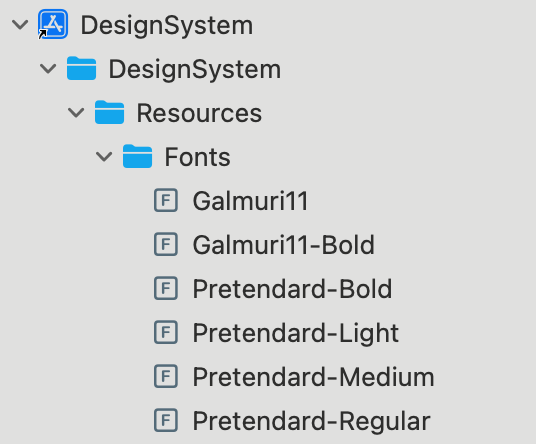
먼저 Framework에 정의하기 위해 module이라는 Bundle을 만들고
폰트 .ttf, otf 파일을 등록해주자.
BundleFinder.swift
import Foundation

class BundleFinder {}
extension Foundation.Bundle {
  static let module = Bundle(for: BundleFinder.self)
}
Resources 등록
☝️DesignSystemFontConvertible
먼저 폰트를 관리하기 쉽게 만드는 구조체를 만든다.
name, familty. path를 입력받는다.
이후 convenience init을 통해 생성 시점에 register를 등록한다.
여기서 중요한 점은 원래는 아래 사진처럼 .plist에 등록을 해줘야하는데
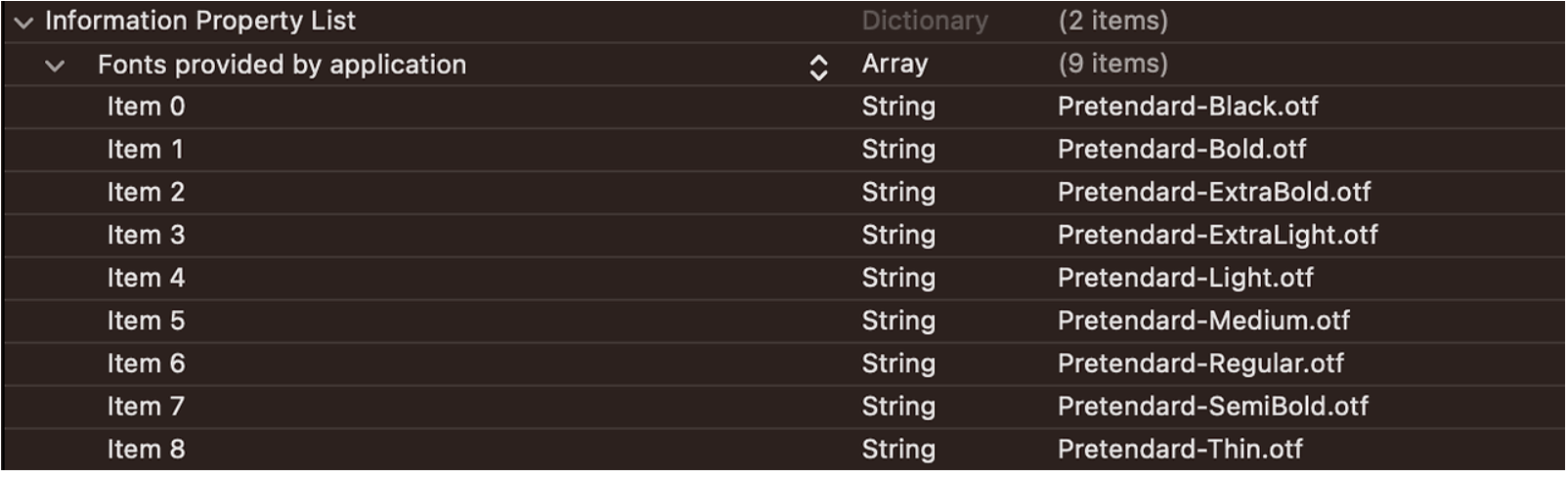
나는 이 과정에 너무 귀찮아서
CTFontManagerRegisterFontsForURL를 통해 등록한다.
import UIKit.UIFont
import SwiftUI

public struct DesignSystemFontConvertible: Sendable {
  public typealias Font = UIFont
  public let name: String
  public let family: String
  public let path: String

  fileprivate var url: URL? {
    return Bundle.module.url(forResource: path, withExtension: nil)
  }

  public func font(size: CGFloat) -> SwiftUI.Font {
    guard let font = Font(font: self, size: size) else {
      fatalError("Unable to initialize font '\(name)' (\(family))")
    }
    return SwiftUI.Font(font)
  }

  public func register() {
    guard let url = url else { return }
    /// 특정 URL에서 TTF(TrueType Font) 또는 OTF(OpenType Font) 폰트를 로드하여 시스템에 추가
    /// .process → 현재 실행 중인 앱에서만 사용 가능하게 등록
    /// persistent은 사용자가 폰트를 시스템에 영구적으로 등록
    CTFontManagerRegisterFontsForURL(url as CFURL, .process, nil)
  }
}

public extension DesignSystemFontConvertible.Font {
  convenience init?(font: DesignSystemFontConvertible, size: CGFloat) {
    // 등록 되어 있지 않다면 등록
    if !UIFont.fontNames(forFamilyName: font.family).contains(font.name) {
      font.register()
    }
    self.init(name: font.name, size: size)
  }
}
✌️DesignSystemFontFamily
여기서 우리가 사용할 폰트 정보를 써준다.
이때 위에서 정의한 DesignSystemFontCovertible을 사용한다.
public enum DesignSystemFontFamily: Sendable {
  public enum Pretendard: Sendable {
    public static let bold = DesignSystemFontConvertible(
      name: "Pretendard-Bold",
      family: "Pretendard",
      path: "Pretendard-Bold.otf"
    )
    public static let light = DesignSystemFontConvertible(
      name: "Pretendard-Light",
      family: "Pretendard",
      path: "Pretendard-Light.otf"
    )
    public static let medium = DesignSystemFontConvertible(
      name: "Pretendard-Medium",
      family: "Pretendard",
      path: "Pretendard-Medium.otf"
    )
    public static let regular = DesignSystemFontConvertible(
      name: "Pretendard-Regular",
      family: "Pretendard",
      path: "Pretendard-Regular.otf"
    )
    public static let all: [DesignSystemFontConvertible] = [bold, light, medium, regular]
  }
  public enum Galmuri11: Sendable {
    public static let regular = DesignSystemFontConvertible(
      name: "Galmuri11-Regular",
      family: "Galmuri11-Regular",
      path: "Galmuri11.ttf"
    )
    public static let bold = DesignSystemFontConvertible(
      name: "Galmuri11-Bold",
      family: "Galmuri11-Bold",
      path: "Galmuri11-Bold.ttf"
    )
    public static let all: [DesignSystemFontConvertible] = [regular, bold]
  }
  public static let allCustomFonts: [DesignSystemFontConvertible] = [
    Pretendard.all, Galmuri11.all
  ].flatMap { $0 }
}
👍사용
다음과 같이 사용하면 된다.
  Text("Search")
          .font(DesignSystemFontFamily.Galmuri11.regular.font(size: 20))
😀 소감 및 마무리
이거는 새로운 프로젝트에서도 많이 써먹을 것 같다.
반응형