@resultBuilder

👋 들어가기 전
오픈소스를 보고 있다가, 신기한 attribute가 있어서 학습해보려고한다.
그 주인공은 바로 @resultBuilder라는 attribute다.
🏁 학습할 내용
- DSL이란
- @resultBuilder
🧩 DSL이란
뜬겂없긴한데, 생각보다 요즘 공부하다보면 생각보다 자주 나오는 단어다.
DSL은, Domain Specific Language로, 특정한 목적(도메인)에 특화된 언어다.
즉, 일반적인 프로그래밍 언어가 아니라, 특정 문제를 해결하기위한 언어다.
개발자면 사실, 많이 마주쳐봤다.
대표적으로 뭐가 있을까??
- HTML
- SQL
무슨 느낌인지 감이온다.
HTML -> 웹페이지라는 특정 도메인에 특화된 언어
SQL -> 데이터베이스라는 특정 도메인에 특화된 언어,
그렇다면 Swift는 DSL일까??, Swift는 어떤 특정 도메인에 속할까??
아니다.. iOS UI를 그릴 수도 있지만, UI없이 동작할 수 있다.
🏭 @resultBuilder
⭐️ 정의
A result builder type is a type that can be used as a result builder, which is to say, as an embedded DSL for collecting partial results from the expression-statements of a function and combining them into a return value.
A result builder type must satisfy two basic requirements:
1. It must be annotated with the @resultBuilder attribute, which indicates that it is intended to be used as a result builder type and allows it to be used as a custom attribute.
2. It must supply at least one static buildBlock result-building method.
result Builder는 복잡한 계층구조를 가진 형태를 DSL를 통해 해결할 수 있게 도와주는 attribute다.
대표적으로 @viewBuilder가 있다.
@viewBuilder는 말그대로 여러개의 view를 조합해서 하나의 VIew를 만든다.
@resultBuilder public struct ViewBuilder {

    /// Builds an expression within the builder.
    public static func buildExpression<Content>(_ content: Content) -> Content where Content : View

    /// Builds an empty view from a block containing no statements.
    public static func buildBlock() -> EmptyView

    /// Passes a single view written as a child view through unmodified.
    ///
    /// An example of a single view written as a child view is
    /// `{ Text("Hello") }`.
    public static func buildBlock<Content>(_ content: Content) -> Content where Content : View

    public static func buildBlock<each Content>(_ content: repeat each Content) -> TupleView<(repeat each Content)> where repeat each Content : View
}
VStack {
Text("Hello")
Text("World")
}
// 실제로는
VStack(content: {
ViewBuilder.buildBlock(
Text("Hello"),
Text("World")
)
})
📝 선언
1. 먼저 만들려는 클래스, 구조체, 함수등에 @resultBuilder를 붙이는 것에서 시작한다.
@resultBuilder
struct TraceBuilder {

}
2. 필요한 상황에 맞는 build함수를 구현한다.
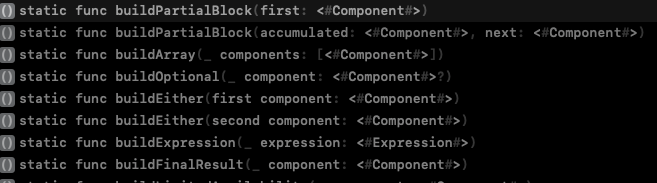
정말 많은 build함수가 있다.
여기서 몇개만 해보자
@resultBuilder
struct TraceBuilder {
    // MARK: - 기본 블록 조합
    static func buildBlock(_ components: [String]...) -> [String] {
        print("➡️ buildBlock:", components.flatMap { $0 })
        return components.flatMap { $0 }
    }

    // MARK: - 개별 표현식 처리
    static func buildExpression(_ expression: String) -> [String] {
        print("🧩 buildExpression:", expression)
        return [expression]
    }

    // MARK: - Optional (if문)
    static func buildOptional(_ component: [String]?) -> [String] {
        print("❓ buildOptional:", component ?? [])
        return component ?? []
    }

    // MARK: - Either (if / else)
    static func buildEither(first component: [String]) -> [String] {
        print("✅ buildEither(first):", component)
        return component
    }
    static func buildEither(second component: [String]) -> [String] {
        print("🚫 buildEither(second):", component)
        return component
    }

    // MARK: - Array (for문)
    static func buildArray(_ components: [[String]]) -> [String] {
        print("🔁 buildArray:", components.flatMap { $0 })
        return components.flatMap { $0 }
    }

    // MARK: - Partial block (점진적 빌드)
    static func buildPartialBlock(first: [String]) -> [String] {
        print("🔹 buildPartialBlock(first):", first)
        return first
    }

    static func buildPartialBlock(accumulated: [String], next: [String]) -> [String] {
        print("🔸 buildPartialBlock(accumulated:next:)", accumulated, "+", next)
        return accumulated + next
    }

    // MARK: - 최종 결과
    static func buildFinalResult(_ component: [String]) -> [String] {
        print("🏁 buildFinalResult:", component)
        return component
    }
}
🔍 결과
@TraceBuilder
func traceExample(includeExtra: Bool) -> [String] {
    "A"

    if includeExtra {
        "B"
    } else {
        "X"
    }

    for i in 1...2 {
        "Loop \(i)"
    }

    "C"
}

let result = traceExample(includeExtra: true)
print("\n📦 최종 결과:", result)

🧩 buildExpression: A
🧩 buildExpression: B
🔹 buildPartialBlock(first): ["B"]
✅ buildEither(first): ["B"]
🧩 buildExpression: Loop 1
🔹 buildPartialBlock(first): ["Loop 1"]
🧩 buildExpression: Loop 2
🔹 buildPartialBlock(first): ["Loop 2"]
🔁 buildArray: ["Loop 1", "Loop 2"]
🧩 buildExpression: C
🔹 buildPartialBlock(first): ["A"]
🔸 buildPartialBlock(accumulated:next:) ["A"] + ["B"]
🔸 buildPartialBlock(accumulated:next:) ["A", "B"] + ["Loop 1", "Loop 2"]
🔸 buildPartialBlock(accumulated:next:) ["A", "B", "Loop 1", "Loop 2"] + ["C"]
🏁 buildFinalResult: ["A", "B", "Loop 1", "Loop 2", "C"]

📦 최종 결과: ["A", "B", "Loop 1", "Loop 2", "C"]
📊 출력 분석
| 1 | buildExpression("A") | 첫 표현식 |
| 2 | buildPartialBlock(first:) | 초기화 |
| 3 | buildEither(first:) | if 조건 분기 (true) |
| 4 | buildPartialBlock(accumulated:next:) | 누적 (A + B) |
| 5 | buildArray | for 루프 내부 |
| 6 | buildPartialBlock(accumulated:next:) | 누적 (A, B + Loop 1, Loop 2) |
| 7 | buildPartialBlock(accumulated:next:) | 누적 (A, B, Loops + C) |
| 8 | buildFinalResult | 최종 결과 |
🧠 핵심 요약
함수 |
호출 시점 | 설명 |
| buildExpression | 각 줄 (리터럴, 표현식) | "A", "B" 등 처리 |
| buildPartialBlock(first:) | 첫 줄 처리 | 초기화 역할 |
| buildPartialBlock(accumulated:next:) | 다음 줄 등장할 때마다 | 이전 결과 + 다음 줄 |
| buildArray | for 루프 결과 결합 | |
| buildEither | if/else 선택 분기 | |
| buildFinalResult | 전체 빌드 완료 시점 |
출처
swift-evolution/proposals/0289-result-builders.md at main · swiftlang/swift-evolution
This maintains proposals for changes and user-visible enhancements to the Swift Programming Language. - swiftlang/swift-evolution
github.com
https://medium.com/hcleedev/swift-resultbuilder는-무엇일까-a97ab7a47be6
Swift: @resultBuilder는 무엇일까?
Swift 5.4에 정식으로 등장한 resultBuilder가 무엇인지, 왜 나타났는지, 그리고 어떻게 사용되는지 알아보자.
medium.com