H2 Database

💾H2
🧩역할
- 자바 기반의 경량 RDBMS
- 용량이 매우 가벼움
- MySQL, Oracle DB 같이 규모있는 DB를 쓰기 전, 가볍게 사용해 보기 좋음
🔨 설치
dependencies {
	runtimeOnly("com.h2database:h2")
}
⚙️설정
1️⃣application.yml 파일에 설정을 해준다.
spring:
  h2:
    console: # H2 DB를 웹에서 관리할 수 있는 기능
      enabled: true # H2 Console 사용 여부
      path: /h2-console # H2 Console 접속 주소

  # H2 Database 설정
  datasource:
    driver-class-name: org.h2.Driver # 드라이브 클래스명
    url: jdbc:h2:~/local # H2 DB 연결 주소 (Embedded Mode)
    username: sa # H2 DB 접속 ID (사용자 지정)
    password: # H2 DB 접속 PW (사용자 지정)
2️⃣db 파일 만들기
위 url에 따르면 ~/ 경로에 local.mv.db 파일을 만들어주면된다.
~/는 보통 User 경로다.
👀콘솔 확인
http://localhost:8080/h2-console
링크로 들어가면 다음과 같은 콘솔을 확인할 수 있다.
/h2-console은 위 .yml파일에 저장한 console의 path를 따라간다.
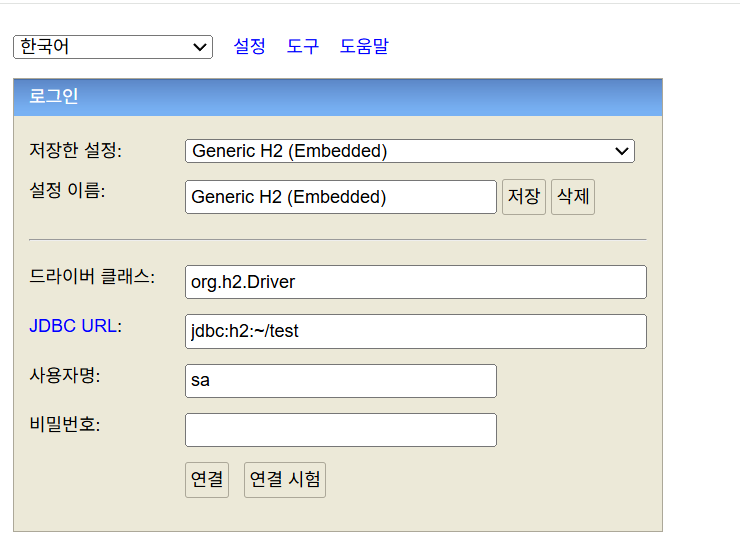
여기서 JDBC URL을 우리가 만든 db파일의 위치인 ~/local로 변경 후, 연결 버튼을 눌러보자.
오, MySQL같은 DBMS 소프트웨어가 켜진 것 같은 웹이 보인다.
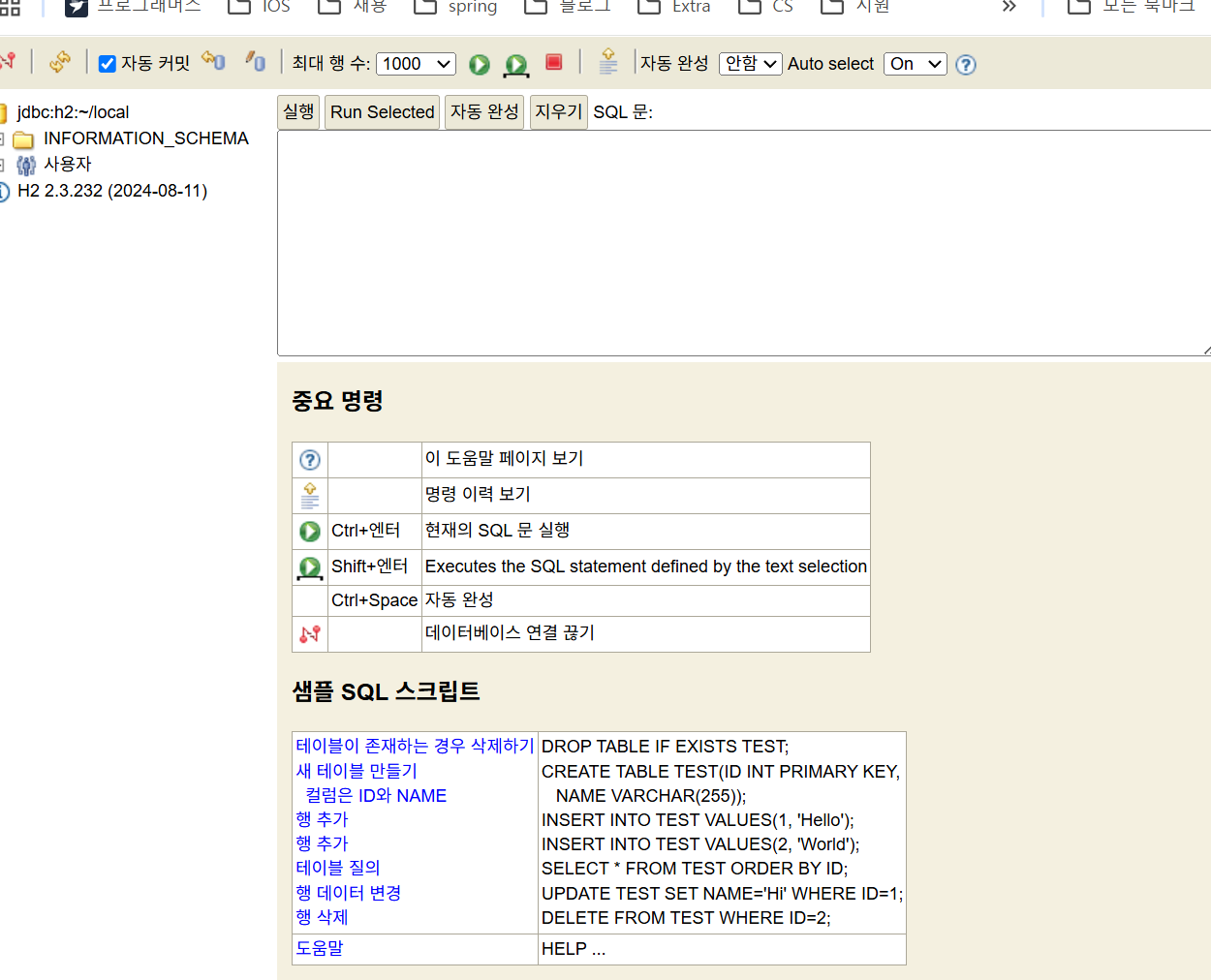
일단, H2 관련된 큼직한 세팅은 끝이다. 다음은 남은 JPA 관련된 작업을 끝내보자.
☕JPA 추가 설정
🔨 설치
dependencies {
	implementation("org.springframework.boot:spring-boot-starter-jdbc")
}
⚙️설정
spring:

  # JPA 설정
  jpa:
    hibernate:
      ddl-auto: update # DB 초기화 전략 (none, create, create-drop, update, validate)
    properties:
      hibernate:
        dialect: org.hibernate.dialect.H2Dialect #스프링 부트와 하이버네이트를 함께 사용할 때 필요한 설정
        format_sql: true # 쿼리 로그 포맷 (정렬)
        show_sql: true # 쿼리 로그 출력
- dialect: org.hibernate.dialect.H2Dialect
- 표준 SQL이 아닌 하이버네이트만의 SQL을 사용할 때, 필요한 항목
- ddl-auto
- none: 엔티티가 변경되어도, 데이터베이스를 변경하지 않음
- create: 스프링 부트 서버를 시작할 때, 테이블을 모두 삭제한 후, 다시 생성
- create-drop: create와 동일하지만, 서버 종료 시, 테이블을 모두 삭제
- update: 엔티티의 변경도니 부분만 데이터베이스에 적용
- validate: 엔티티와 테이블 간에 차임점이 있는지 검사만 함
✅ 최종 결과
dependencies {
	implementation("org.springframework.boot:spring-boot-starter-web")
	implementation("org.springframework.boot:spring-boot-starter-web-services")
	implementation("com.fasterxml.jackson.module:jackson-module-kotlin")
	implementation("org.jetbrains.kotlin:kotlin-reflect")
	implementation("org.springframework.boot:spring-boot-starter-jdbc") // ✅ 추가
    implementation("org.springframework.boot:spring-boot-starter-date-jpa") // ✅ 추가
	testImplementation("org.springframework.boot:spring-boot-starter-test")
	testImplementation("org.jetbrains.kotlin:kotlin-test-junit5")
	testRuntimeOnly("org.junit.platform:junit-platform-launcher")
	developmentOnly("org.springframework.boot:spring-boot-devtools")
	runtimeOnly("com.h2database:h2") // ✅ 추가
}
spring:
  h2:
    console: # H2 DB를 웹에서 관리할 수 있는 기능
      enabled: true # H2 Console 사용 여부
      path: /h2-console # H2 Console 접속 주소

  # H2 Database 설정
  datasource:
    driver-class-name: org.h2.Driver # 드라이브 클래스명
    url: jdbc:h2:~/local # H2 DB 연결 주소 (Embedded Mode)
    username: sa # H2 DB 접속 ID (사용자 지정)
    password: # H2 DB 접속 PW (사용자 지정)


  # JPA 설정
  jpa:
    hibernate:
      ddl-auto: update # DB 초기화 전략 (none, create, create-drop, update, validate)
    properties:
      hibernate:
        dialect: org.hibernate.dialect.H2Dialect #스프링 부트와 하이버네이트를 함께 사용할 때 필요한 설정
        format_sql: true # 쿼리 로그 포맷 (정렬)
        show_sql: true # 쿼리 로그 출력
출처
http://www.h2database.com/html/main.html
H2 Database Engine
H2 Database Engine Welcome to H2, the Java SQL database. The main features of H2 are: Very fast, open source, JDBC API Embedded and server modes; in-memory databases Browser based Console application Small footprint: around 2.5 MB jar file size Supp
www.h2database.com
https://congsong.tistory.com/46
스프링 부트(Spring Boot) - 5분 안에 H2 Database와 JPA 연동해보기
1. H2 Database란? H2 DB는 자바 기반의 오픈소스 관계형 데이터베이스 관리 시스템(RDBMS)입니다. 보통 테스트 단계 또는 작은 규모의 프로젝트에서 사용되며, Gradle 또는 Maven에 의존성만 추가해 주면
congsong.tistory.com