iOS/SwiftUI
UIViewRepresentable
Hamp
2024. 10. 12. 23:13
반응형

이전 포스팅에서는 SwiftUI -> UIKit에서 사용하는 방법론을 알아봤다.
이번에는 UIkit에서 SwiftUI로 사용하는 법을 알아보자.
정의

UIkit의 UIview를 SwiftUI 계층에서 쓰기 위한 래퍼 프로토콜이다.
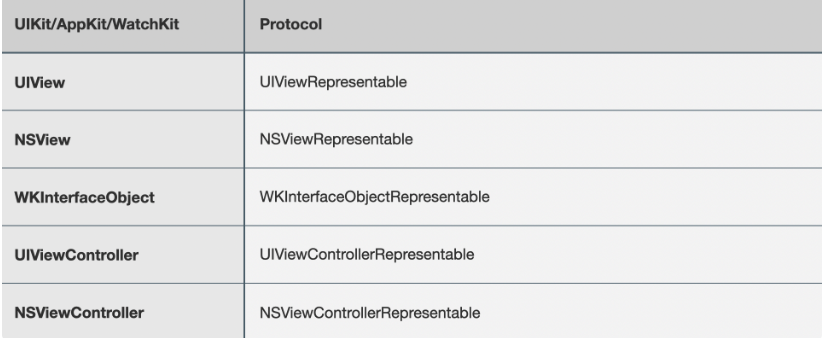
더 자세히는 다음과 같다고한다.
이번 시간도 저번 포스팅과 같이 UITextField가 수정되면 swiftUI의 View의 백그라운드 색깔을 바꿔보자.
구현
- UIViewRepresentable 채택한다.
- Coordinator를 만든다.
- updateUIView를 구현한다
- makeUIView를 구현한다
- makeCoordinator구현한다.
- swiftUI에서 생성 후 바인딩해주기
1. UIViewRepresentable를 채택
여기서 context와 coordinator라는 개념이 나오는데 하나씩 알아보자.
Coordinator
- Coordinator는 SwiftUI 상태와 UIKit 이벤트(예: UITextField의 텍스트 변경)를 연결하는 중재자 역할을 합니다.
Context
- Context는 Coordinator 객체에 대한 참조를 가지고 있어 SwiftUI와 UIKit 간의 상호작용을 돕는다.
- context.coordinator를 통해 SwiftUI 상태를 관리할 수 있고, UIKit의 이벤트(예: 버튼 클릭, 텍스트 입력)에도
반응할 수 있다.
- context.coordinator를 통해 SwiftUI 상태를 관리할 수 있고, UIKit의 이벤트(예: 버튼 클릭, 텍스트 입력)에도
- Context는 SwiftUI 뷰의 환경 정보도 포함한다.
- 예를 들어, Environment 값을 사용할 때 Context를 통해 전달할 수 있다.
- 이 정보는 주로 SwiftUI의 레이아웃, 접근성 설정, 뷰의 크기, 방향 등 환경 설정을 포함한다
struct UITextFieldWrapper: UIViewRepresentable {

    @Binding private var text: String
    @Binding private var backgroundColor: Color

    init(text: Binding<String>, backgroundColor: Binding<Color>) {
        self._text = text
        self._backgroundColor = backgroundColor
    }

    /// Coordinator는 SwiftUI에서 UIKit의 UITextField 이벤트를 관리하는 객체
    class Coordinator: NSObject {
        @Binding private var text: String
        @Binding private var backgroundColor: Color
        var parent: UITextFieldWrapper

        public init(parent: UITextFieldWrapper,text: Binding<String>, backgroundColor: Binding<Color>) {
            self.parent = parent
            self._text = text
            self._backgroundColor = backgroundColor
        }

        @objc func textChanged(_ sender: UITextField) { // 이벤트 핸들링
            guard let text = sender.text else { return }
            self.text = text
            self.backgroundColor = .random()
        }

    }

    /// swiftUI에서 UIKit 뷰 객체를 업데이트 해준다.
    func updateUIView(_ uiView: UITextField, context: Context) {
        uiView.text = text
    }

    // wrapping 당할 view를 만들어준다.
    func makeUIView(context: Context) -> UITextField {
        let textField = UITextField()
        textField.addTarget(context.coordinator, action: #selector(context.coordinator.textChanged(_:)), for: .editingChanged) // 액션 연결
        return textField
    }

    //  UIKit 객체에게 신호를 보낼 coordinator를 생성한다.
    func makeCoordinator() -> Coordinator {
        Coordinator(parent: self, text: $text, backgroundColor: $backgroundColor)
    }
}
2. SwiftUI에 생성 후 바인딩하기
struct ContentView: View {
    @State private var text: String = ""
    @State private var backgroundColor: Color = .white

    var body: some View {
        VStack {
            // Display the UITextFieldWrapper
            UITextFieldWrapper(text: $text, backgroundColor: $backgroundColor)
                .background(.blue)
                .frame(height: 40)
                .padding()

            // A SwiftUI view that changes background color
            Text("SwiftUI View")
                .padding()
                .frame(maxWidth: .infinity)
                .background(backgroundColor)
                .cornerRadius(10)
                .padding()
        }
        .padding()
    }
}
결과
참고
UIViewRepresentable | Apple Developer Documentation
A wrapper for a UIKit view that you use to integrate that view into your SwiftUI view hierarchy.
developer.apple.com
SwiftUI와 UIKit 같이 사용하기 | Hohyeon Moon
SwiftUI와 UIKit을 같이 사용하는 방법에 대해 알아봅니다
www.hohyeonmoon.com
반응형